A podcast clip is worth choosing when it gives your audience something specific and still makes sense to someone who hasn’t heard the rest of the episode. That might be an answer to a question, an explanation of a practice, a clear example or a useful observation. The most intense moment isn’t automatically the best one.
This guide is about judging segments: what to look for, what to keep, where to start and end, and what to flag before editing. It doesn’t promise that any clip will get attention, and it doesn’t cover the wider process of turning an episode into short videos.
Start with one audience and one point
Before you mark anything, decide two things:
- Who the clip is for. What would they want to know?
- The one point the clip should make. Try to write it as a single sentence.
Then ask why this audience would want to hear it. A segment is worth considering when it:
- answers a specific question,
- explains how someone does something,
- gives a clear example, or
- offers an observation the audience can use.
If you can’t write the sentence, the candidate usually isn’t ready. If you can write it but can’t say why the audience would care, think again before spending editing time on it.
What makes a segment worth considering
These five checks are editorial guidance, not an industry standard.
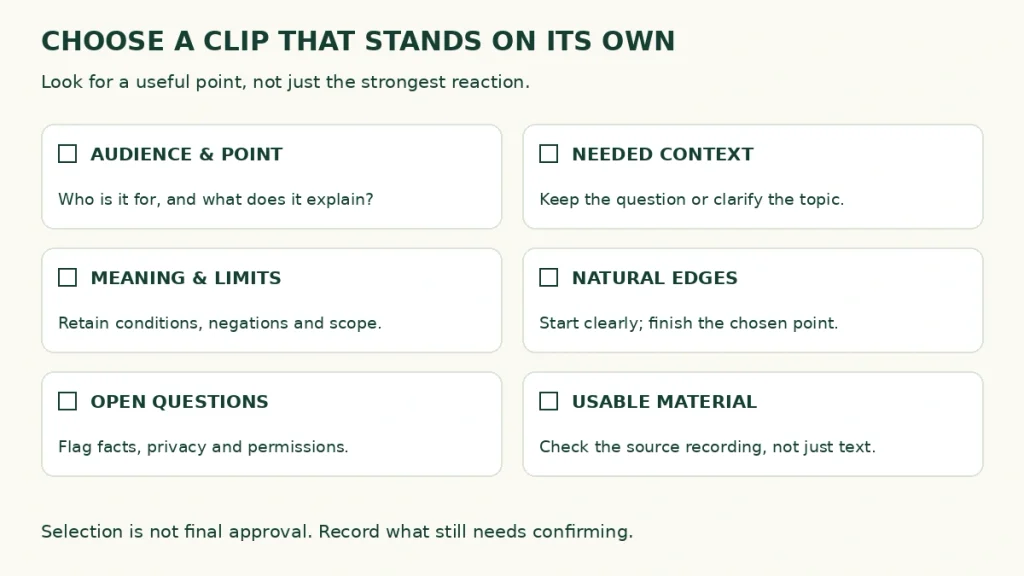
- A clear core point. You can say what the segment is about.
- Enough background. A viewer can follow it without the rest of the episode.
- Something specific. An explanation, an example or a conclusion, not only an opinion.
- Natural edges. A beginning and an end you can keep.
- Usable sound and picture. The recording is good enough to be used.
Strong reactions are not the same as a good clip
Strong emotion, disagreement or laughter can make a moment memorable. They don’t make it a clear or complete clip. Judge the moment by the five checks above first.
“Standing on its own” doesn’t mean “no background”
A clip that stands on its own is one a viewer can follow. It doesn’t have to have no background at all. You have several ways to supply it:
- Keep the host’s question, if it sets up what the guest answers.
- Widen the cut a little, to include a sentence that sets the scene.
- Add a short, accurate line of text on screen.
Added text can state what was asked or what the topic is. It can’t give the guest a view they didn’t express, and it can’t present a guess as fact. If a clip is still hard to follow after you’ve added context, or the added context would make it easy to misread, consider leaving it out.
“Complete” doesn’t mean the whole answer
A complete point doesn’t require the guest’s entire answer. You can tighten it. What you can’t remove is anything that changes the meaning:
- a condition (“only when…”),
- a negation (“not”, “never”),
- a time frame,
- the person or thing being talked about,
- a limit or exception.
Cutting pauses or shortening an answer doesn’t automatically keep the meaning. Check what the speaker said against what remains.
The host’s question
If the question supplies background the clip needs, keep it, or replace it with a short, accurate line of text. Don’t write a new title that changes what the guest meant.
Choosing where a clip starts and ends
Check both the wording and the recording.
The start should tell the viewer who or what is being discussed and what the question is. Avoid starting in the middle of a word, or on a reference like “this”, “they” or “that time” that isn’t explained.
The end should finish this one point, and keep the limits and explanation it needs.
If a reference is unclear, see whether you can supply the missing background with a short, accurate line, or by widening the cut. If you can’t, choose another segment.
The final length also has to fit what’s been agreed for delivery. That’s a real constraint, but don’t cut a qualifier or an explanation to meet it. If the point doesn’t fit, talk to the project contact about the scope, or choose another segment.
Note open questions as you select
Mark anything that needs a decision while you select, so it doesn’t surface at the end. Treat these as separate questions, because each has a different answer and a different person to ask:
- Facts. Numbers and claims that haven’t been verified.
- Privacy. Personal or sensitive information.
- Permission. Whether the content, including guests, music, images and anything third-party, may be used.
- Quality of the material. Recording problems that can’t be fixed.
- Misreading. Places where a short cut could be taken the wrong way.
Flag the doubt and ask the suitable person to confirm. A segment with a number or a sensitive subject isn’t automatically ruled out. It means someone needs to check, and the editor shouldn’t guess. A client saying “that’s fine” doesn’t settle every one of these questions at once.
An automatic transcript can help you find a moment. Listen to the original recording before you decide, because a transcript can be wrong, and a transcript that matches the recording doesn’t make the statement true.
A candidate table you can copy
Use one row per candidate. The columns are an example, so adjust them to your project.
| Clip ID | Source file / timecode | Core point and background needed | Decision and reason |
|---|---|---|---|
For Decision, use one of three labels:
- Use: it goes on the list to be edited. It doesn’t mean the facts, permissions and final video have all been approved.
- To confirm: something important is still open.
- Skip: don’t use it, with a short reason.
Here are some rows with illustrative values:
| Clip ID | Source file / timecode | Core point and background needed | Decision and reason |
|---|---|---|---|
| M01 | ep_main.wav, 12:40–13:25 | Keeping weekly meetings short. Needs the host’s question, plus the guest’s scope. | Use: a clear practice, and the limits are in the answer |
| M02 | ep_main.wav, 21:05–21:40 | A figure the guest quotes. Needs its source. | To confirm: the number hasn’t been checked |
| M03 | ep_cam2.mov, 33:10–33:20 | A reaction with no explanation. | Skip: no clear point |
Use the file name along with the timecode, because with several cameras or files a timecode alone can point to the wrong place.
A hypothetical example: the same conversation, two cuts
This is a hypothetical example, not a real guest or episode. Here is a source conversation:
Host: How do you keep your weekly team meetings from running long?
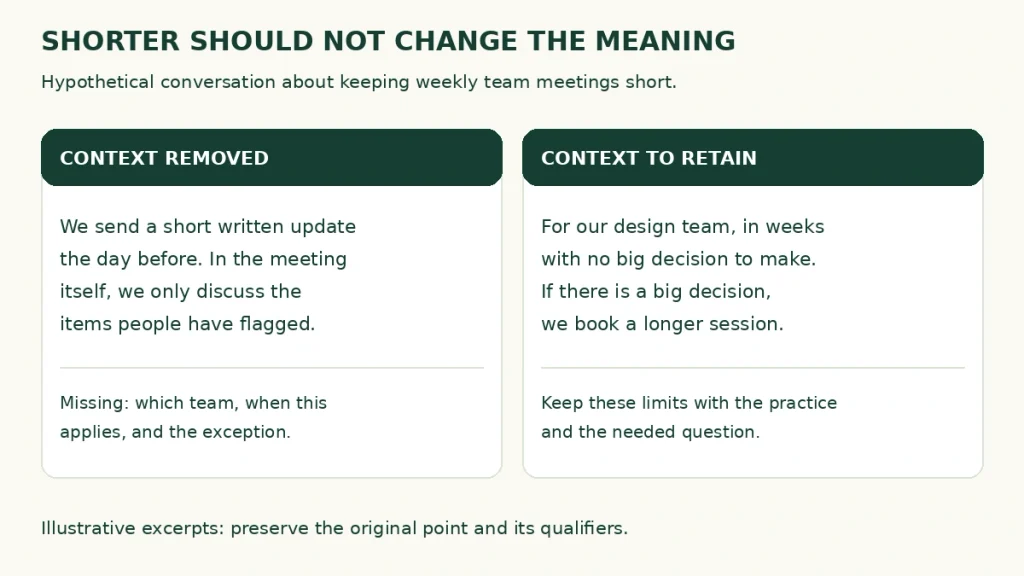
Guest: We send a short written update the day before. In the meeting itself, we only discuss the items people have flagged. That’s for our design team, and only in weeks when nobody has a big decision to make. If there is a big decision, we book a longer session.
A cut that is easy to misread
Guest: We send a short written update the day before. In the meeting itself, we only discuss the items people have flagged.
Every word is from the source. The meaning has changed:
- The object is gone. “That’s for our design team” is missing, so viewers may miss that the practice applies specifically to the guest’s design team.
- The condition is gone. “Only in weeks when nobody has a big decision” is missing, so it reads as a rule for every meeting.
- The exception is gone. “If there is a big decision, we book a longer session” is missing, so it seems the meeting is never longer.
- The question is gone. The host’s question set up the topic, which was keeping meetings from running long.
A cut that keeps the context
Host: How do you keep your weekly team meetings from running long?
Guest: We send a short written update the day before. In the meeting itself, we only discuss the items people have flagged. That’s for our design team, and only in weeks when nobody has a big decision to make. If there is a big decision, we book a longer session.
The second cut keeps the question, the practice, the scope, the condition and the exception, and it’s longer. It also takes the guest’s meaning as it was said. Both cuts come from the same source conversation, and the only difference is what was kept.
When several candidates make the same point
Sometimes several moments in an episode express the same point. Compare them on:
- Audience need: does the audience actually need this version?
- Specific explanation: which one explains it most concretely?
- Context: can its context be kept?
- Start and end: are the edges natural?
- Material: is the sound and picture usable?
Don’t give them numerical scores, and don’t choose only by how intense a moment is or how short it is.
A segment selection checklist
- I can state the clip’s one point in a sentence.
- I can say why the target audience would want it.
- The clip answers a question, explains a practice, gives an example or offers a useful observation.
- Conditions, negations, time frames, objects and limits are kept.
- Any needed background is kept, or added accurately, without putting new views in the guest’s mouth.
- The start doesn’t land mid-word or on an unclear reference, and the end finishes the point.
- The length fits the agreed delivery, without cutting what the meaning needs.
- Facts, privacy, permission and material quality are each checked or flagged for the right person.
- I listened to the original recording, not only the transcript.
FAQ
How long should a clip be?
There’s no universal answer. A clip needs to be long enough to finish its point and keep the limits, and it also has to fit what’s been agreed for delivery. If those conflict, raise it before cutting out something the meaning depends on.
Should I choose the most dramatic moment?
Not automatically. Check whether it’s clear, complete and useful to your audience first.
Can I rely on an automatic transcript?
Use it to find moments. Listen to the original before you choose, and don’t treat it as proof that a statement is correct.
Send your long-form video to KiwiUGC
If you have a long video you have the right to use, you can send it to KiwiUGC, which produces short videos from it within the scope you confirm. Who proposes candidate segments, who approves them, and whether segment selection is part of the work are agreed for each project. KiwiUGC doesn’t promise unlimited segment selection or any result for a clip.
For related guidance, read the webinar repurposing guide.