“How many versions?” is a question that two people can answer differently and both be right. One means creative combinations. The other means files. This guide separates four ideas that often get blurred together: source footage, the base edit, creative variations and exported files. The terms are this article’s working definitions, not an industry standard. Confirm the creative combinations first, then confirm which delivery files each combination needs.
This article is about defining and delivering versions. It doesn’t cover ad testing, performance or ad account work, and it doesn’t suggest that more versions lead to better results.
Four different things
These are four separate concepts, not four levels of “version”. Source footage isn’t a finished ad version at all.
| Concept | What it is | Example |
|---|---|---|
| Source footage | The material the edit is built from | Clips supplied by the brand |
| Base edit | The main edit that the other creative combinations are measured against | One edited ad |
| Creative variation | A change in what the ad says or shows: the opening, the CTA, the order or emphasis of the body, or the angle of the message | The same body with a different opening |
| Export | A delivery file of a creative: its ratio or placement, language, or file format | The same edit as a vertical file and a square file |
A count of creatives and a count of files are different counts, so the scope should say which one it means.
What can change, and what each change needs
Any of the changes below needs material that supports it. Some may also need new content, translation, recording or permission. None of this is automatically included. Each item is agreed per project, and none of it is assumed to be part of a KiwiUGC project.
Different openings
A different opening needs footage or a line that already exists in the material, or new material arranged separately.
Different CTAs
A different call to action needs an ending the footage and the approved message can support. If the new CTA needs a new line of speech, a new recording or new footage, that’s a separate arrangement. CTA wording is a topic of its own and isn’t covered here.
Different body order or emphasis
Reordering or emphasising different parts needs material that covers those parts, and the result must keep the original meaning. It’s an edit decision, not an export.
Placement formats: ratio and framing
Changing the encoding or file format at the same ratio can be only an export. Reframing for a different ratio or placement may be an editing job, because the picture and the on-screen text have to be arranged again, and not every shot reframes well. Check the agreed placements and the platform’s current official requirements. No fixed ratio or size is assumed here.
Caption or language versions
Captions in the same language as the audio are one task. A translated caption needs a translation and a review. A replaced voice-over needs a new recording. Localised wording needs new writing and a review. These aren’t the same amount of work and none of them is assumed to be included.
You can manage all of these along delivery dimensions, such as ratio and language, in a version list. That doesn’t mean they take the same effort or are included by default.
Counting versions: a hypothetical example
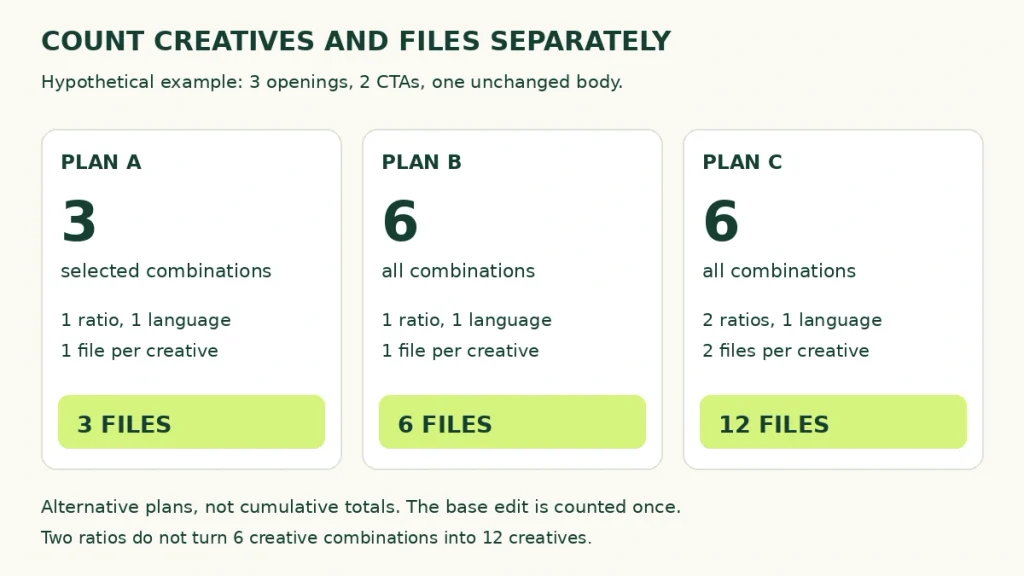
This is a hypothetical example, not a client project. Say a brand has one base edit and wants to use three openings (H1, H2, H3) and two CTAs (C1, C2).
The base edit already uses opening H1 and CTA C1, so the base edit is the combination H1+C1. It’s counted once, as a creative in the list, and not again as a separate item because it’s called the base edit.
If every opening and CTA can sensibly be paired, there are 3 × 2 = 6 possible combinations, provided the body stays the same.
Here are three alternative plans. They don’t add up: you choose one.
| Plan | Creative combinations | Delivery files per creative | Files in total |
|---|---|---|---|
| A: selected combinations | 3: H1+C1, H2+C1, H3+C2 | 1 (one ratio, one language) | 3 |
| B: all combinations | 6 | 1 (one ratio, one language) | 6 |
| C: all combinations, two ratios | 6 | 2 (two ratios, one language) | 12 |
Plan C is still six creative combinations. It isn’t twelve different creatives, because the second ratio of each is the same creative in another file.
A full set of combinations isn’t a default recommendation. Choose it only if every pairing makes sense and you actually need it.
A few items aren’t included in the counts in the example above: a separate reference file of the base edit, a different file format, or an editable project file. If you want any of them delivered, add them to the delivery list and to the total file count, so nothing is missed. Whether any of them costs extra is agreed per project. Don’t infer a price from the number of files.
A simple version list
Two tables work better than one wide one. Use the same Creative IDs in both. The Creative ID names a creative combination. A revision number belongs to the file, not the ID, so a fixed typo doesn’t create a new creative.
Table 1: creatives
| Creative ID | Opening | Body | CTA |
|---|---|---|---|
Table 2: delivery files
| Creative ID | Ratio / placement | Language | Delivered file |
|---|---|---|---|
The same Creative ID can appear on several rows in Table 2, one for each delivery file.
Here is Plan A filled in. The ratio and language are conditions of this hypothetical example, not platform requirements.
| Creative ID | Opening | Body | CTA |
|---|---|---|---|
| CR01 (base edit) | H1 | Original order | C1 |
| CR02 | H2 | Original order | C1 |
| CR03 | H3 | Original order | C2 |
| Creative ID | Ratio / placement | Language | Delivered file |
|---|---|---|---|
| CR01 | 9:16 | English | cr01_9x16_en_r1.mp4 |
| CR02 | 9:16 | English | cr02_9x16_en_r1.mp4 |
| CR03 | 9:16 | English | cr03_9x16_en_r1.mp4 |
Under Plan C, each of the six IDs would have two rows in Table 2, one per ratio.
What to confirm in the scope
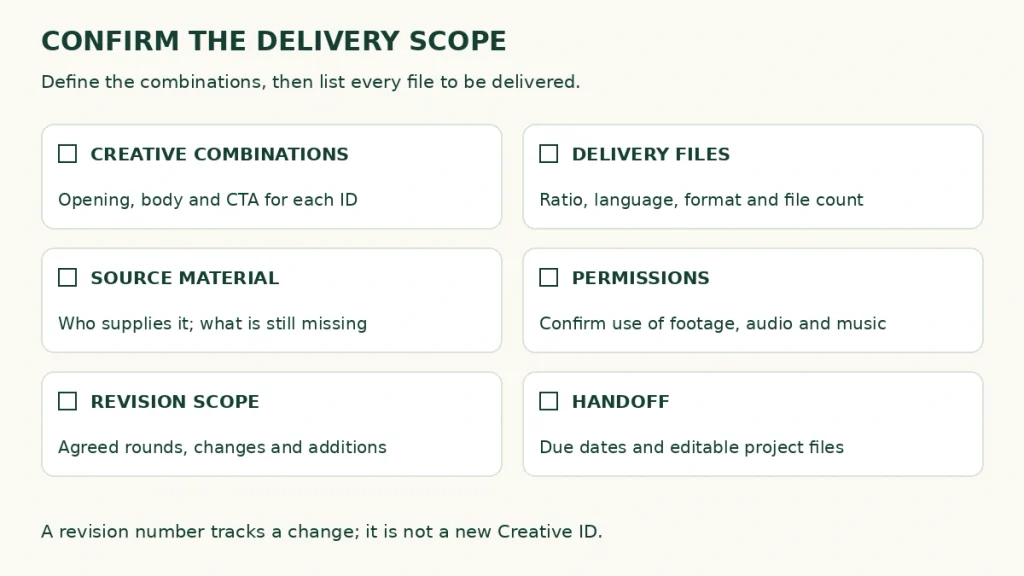
Agree these before editing starts, and write down who provides each item and who reviews it:
- Combinations: which creatives are included, listed in Table 1.
- Delivery count: how many files per creative, listed in Table 2.
- Material needed: which footage the edit relies on, and whether it’s enough for each creative.
- Captions and audio: which language, who writes or translates, who reviews, and whether a new recording is needed.
- Permissions: whether the footage, audio and music may be used for the planned ads. Whether the material is enough and whether you have the right to use it are separate questions, and each needs its own answer.
- Revision rounds: how many, and what a round covers.
- Delivery time: when each set of files is due.
- Editable project files: whether they’re included. Don’t assume they are.
Changing a version or adding one
Treat these differently, and agree on the difference up front:
- A change to an existing version. Fixing a typo, or adjusting the edit according to feedback that was already agreed, doesn’t create a new creative.
- An addition. A new opening, a new combination, or a new language delivery outside the original scope may increase the scope.
What counts as which depends on the task both sides agreed. This article doesn’t set a universal rule, and it doesn’t assume that additions are free or that every change counts as an addition.
After delivery, check each agreed version one by one against the list.
A simple file naming example
One example is enough: put the Creative ID, ratio, language and revision number in the name.
cr02_9x16_en_r1.mp4
cr02is the Creative ID.9x16is the ratio of this example’s delivery.enis the language.r1is the revision number.
A fixed typo becomes r2, not a new creative. Use underscores or hyphens, whichever you pick, and keep to one. The ratio label is a condition of this example, not a platform requirement. Avoid naming several files “final”.
FAQ
Does a ratio export count as a new version?
By this article’s definition it’s another delivery file of the same creative. Whether it’s counted or priced separately is something to write down in the scope, because reframing can involve editing work.
Does every revision count as a new version?
No. A revision to an existing version isn’t automatically a new creative. Agree up front what counts as a revision and what counts as an addition.
Do more versions mean better results?
This article doesn’t make that claim. Versions are a planning and delivery question here, not a performance one.
Send your footage to KiwiUGC
If you have footage you have the right to use and want it edited into ads, you can send it to KiwiUGC. KiwiUGC produces ad edits, alternative openings and versions within the scope you confirm. Revision rounds, the number of versions, delivered files and timing are confirmed for each project.
For related guidance, read the UGC video editing checklist.