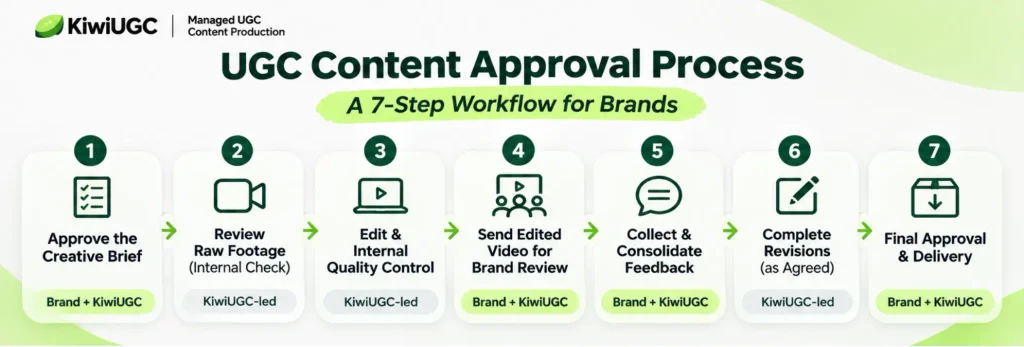
A UGC content approval process is the set of checkpoints a brand uses to review creator-made videos it has commissioned, from the approved brief to final delivery. A finished video is not automatically ready for use. It still needs to be checked against the brief, corrected where necessary, and confirmed for the way you plan to use it. Below: the steps, a review checklist, revision vs. reshoot, and where approval ends and usage rights begin.
What Is the UGC Content Approval Process?
It confirms that a video matches what was agreed before it goes into use. Three parties are involved:
- Creator: films the footage described in the brief.
- Production partner: coordinates production, checks footage, edits, manages revisions and delivers the files.
- Brand: reviews the edited video and gives the final content approval.
This guide covers commissioned creator videos, not moderation of content customers post on their own.
The UGC Content Approval Process: Step by Step

These seven steps describe one way a managed UGC production can run. They are a suggested method, not an industry standard, and projects differ. Here, brands do not manage creators directly by default. The production partner does, and the brand reviews the edited result.
Step 1: Approve the Creative Brief Before Production
Every later check is made against the brief, so approve it before anyone films. Confirm the key message, product benefits, required shots, hook and CTA, format, deliverables, content restrictions and agreed usage scope. If a required shot is not in the brief, nobody can fairly say it was missed. See our guide to the UGC creative brief for the fields.
Step 2: Review Raw Footage Internally
The creator submits footage to KiwiUGC, which checks it before editing starts. Are the required shots there? Is the audio clear? Does the product demonstration match the brief? Gaps found here can be fixed with the creator while production is still open, and a UGC filming checklist shared up front helps reduce them. Whether a brand receives unedited footage depends on the project agreement, so it should not be assumed. See also our notes on UGC raw footage.
Step 3: Edit and Complete Internal Quality Control
The footage is edited into the agreed versions and checked again. The checks cover the hook, pacing, captions, CTA, aspect ratio, technical quality and brand guidelines. The brand should see a version that has passed these checks, not a first draft.
Step 4: Send the Edited Video for Brand Review
The brand receives the edited video as a review copy. It is not final delivery. Before review starts, confirm who reviews, who has the final say if reviewers disagree, and when feedback is due. The number of revision rounds and review deadlines should be agreed upon before production begins.
Step 5: Collect and Consolidate Revision Feedback
Gather comments from every internal reviewer into one list, and tie each to a timestamp and a specific change. Here is a hypothetical example of the difference:
- Vague: “The opening feels flat.”
- Timecoded: “0:00–0:03: Start on the close-up of the lid closing instead of the creator speaking. 0:14: The caption says ‘leak-proof’; change it to the approved ‘leak-resistant.’ 0:22–0:25: Change the end-card text to the CTA in the brief.”
Every item in the second version can be done and checked.
Step 6: Complete Revisions and Request Final Approval
Edits are made within the agreed scope and sent back. Reviewers should check that the listed changes were made and raise anything new as a separate request. Sort each request using the section below. If the brand changes an approved brief, the extra production should be assessed and confirmed before work starts.
Step 7: Approve and Deliver Final UGC Assets
Before approving, confirm the exact version, export formats, captions and delivery method, and state in writing which version you are approving. Approval then leads to delivery of the final files, with usage handled as described next.
Brand Approval vs. Usage Rights
Brand approval confirms that the content meets the agreed creative requirements. Usage rights determine how, where and for how long the content may be used. They answer different questions, and approving a video does not widen the rights.
Approval does not give a brand unlimited commercial use. It also does not mean every approval needs a separate purchase, because usage may already be covered in the original project agreement. Before publishing or running paid ads, check the agreement for channels, duration, territory, paid use and editing permissions.
UGC Approval Checklist for Brands
Use this at Step 4 and again at Step 6. Mark each item pass or fix, and flag anything that needs new footage.
Brief and message
- [ ] Every required shot appears, and must-say lines are word for word.
- [ ] The main message is clear, and nothing from the do-not-include list appears.
Product and claims
- [ ] Product name, version and features are correct.
- [ ] Claims match the approved wording, with no unapproved claims about results or health.
- [ ] The demonstration shows the product working as it really does.
Audio and visuals
- [ ] Speech is clear, and the product is visible and in focus when mentioned.
- [ ] Any music is part of the agreed plan.
Captions and text
- [ ] Spelling is correct, timing matches the speech, and text does not cover the product.
CTA and format
- [ ] CTA wording matches the brief.
- [ ] Aspect ratio, length and file format match the agreed specs.
Brand safety and permissions
- [ ] No competitor products or other brands’ logos appear.
- [ ] Required disclosure wording is decided. Requirements vary by market and platform, so confirm yours.
- [ ] Your intended use matches the agreed usage terms.
Editing Revision vs. Reshoot: How to Judge a Change Request
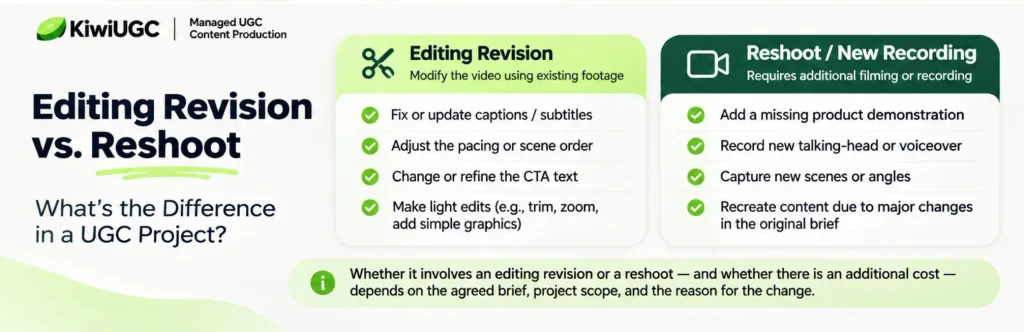

Start with one question: Can this change be made with existing footage?
If yes, it is usually an editing revision. Typical examples: fixing a caption, tightening pacing, swapping in a better take already filmed, or changing CTA text.
If no, do not assume it is a reshoot yet. Ask what the new footage is for:
- A required element from the confirmed brief that the creator did not deliver. A reasonable re-film is handled as the agreement provides.
- A new request that was not in the brief. Assess the extra cost and delivery time before agreeing to it.
New audio is also not always a full reshoot. Re-recording one voice-over line is a much smaller job than refilming a video.
Here is a hypothetical example. The brief required a demo of closing the lid and carrying the bag, but the submitted video never shows it. That is a missing required shot, handled under the agreement. After review, the brand asks for a new scene with the lunch box in a car cup holder. That was not in the brief, so cost and timing come first. Finally, the brand wants the closing line reworded. The creator can re-record just that line, a short job to confirm first.
No project should assume unlimited revisions or free reshoots. What is included depends on the confirmed brief and the project agreement.
Common UGC Approval Mistakes and How to Avoid Them
- Starting without an approved brief. Approve it first, as in Step 1.
- Conflicting feedback from several reviewers. Choose one person to consolidate comments, and agree who decides.
- Vague revision requests. Give timestamps and a specific action.
- Changing requirements after filming. Treat it as a new request and assess it before work begins.
- Skipping the usage check. Compare your intended use with the agreement before publishing.
How a Managed UGC Production Process Simplifies Brand Approval
With KiwiUGC, a brand sends its brief and feedback to one team instead of directing creators one by one. KiwiUGC coordinates the creator, checks footage, manages editing and quality control, organizes revision requests and handles delivery. The brand still does what only a brand can do: judge its own product and message, and approve the final content. Revision rounds and review timing are agreed for each project. You can read more about UGC content creation at KiwiUGC.
Conclusion
Approval works best as defined checkpoints, not an open feedback loop. Approve the brief, check against it, send consolidated feedback, separate revisions from new requests, and confirm usage on its own terms.
Need UGC content without managing creators and revisions yourself? KiwiUGC handles the production process from brief to final delivery.
Start a UGC Project